How to Create Certificates in Canva: Diplomas and PDF Print
Canva certificates (completion diplomas, awards, course credentials) are landscape print pieces: clear hierarchy for name and achievement, consistent branding, and a PDF Print file for the shop or office printer. Unlike a quick flyer promo, a certificate must stay legible when framed and survive trim on heavier stock.
This guide covers landscape certificate templates, Brand Kit, PDF Print, and generating many named copies with Bulk Create. Official help: Margins, bleed, and crop marks, Download file types, and Create designs in bulk.
Certificate templates in Canva
- Open Canva.
- Click Create a design and search Certificate or Diploma.
- Prefer landscape layouts that match your paper (often Letter or A4 landscape).
- Or set Custom size to the exact trim your printer stocks.
- Replace award title, recipient name, date, signature lines, and seal/logo areas.
Confirm orientation and finished size before you design - rotating late forces a full reflow of borders and seals.
Layout that reads as a credential
| Element | Guidance |
|---|---|
| Headline | “Certificate of Completion” / award name - one clear line |
| Recipient | Largest name field; leave room for long names |
| Body | Short achievement line; avoid flyer-style paragraphs |
| Signatures / date | Bottom third; keep inside the safe margin |
| Logo / seal | Brand mark with clearance from trim and ornaments |
Keep decorative borders inside the safe area. Edge flourishes that sit in the bleed risk being cut off.
Apply Brand Kit
Use Brand Kit so every certificate matches your school, company, or event identity:
- Open Brand or Brand Kit.
- Apply approved colors, fonts, and the correct logo variant.
- Check contrast on cream or colored paper - light gold on white often fails in print.
- Lock a master template before you batch names.
Preview client proofs with Canva frame mockups when you present a framed sample.
Show print bleed and safe margins
- Turn on Show print bleed.
- Extend background colors or edge textures into the bleed.
- Keep names, seals, QR codes, and signature lines inside the safe margin.
- Many Canva trim products use about 0.125 in / 3.175 mm bleed - follow on-canvas guides (Canva Help).
Download PDF Print
- Click Share → Download.
- Choose PDF Print (aimed at 300 dpi print quality).
- Tick Crop marks and bleed when your printer needs them.
- Export all pages if you generated a multi-page name batch.
- Open the PDF and spot-check long names for overflow.
| Format | Best for |
|---|---|
| PDF Print | Print shops, Canva Print, office color printers |
| PDF Standard | Screen proofs only |
Do not send PDF Standard when you need bleed and print resolution.
Bulk Create for recipient names
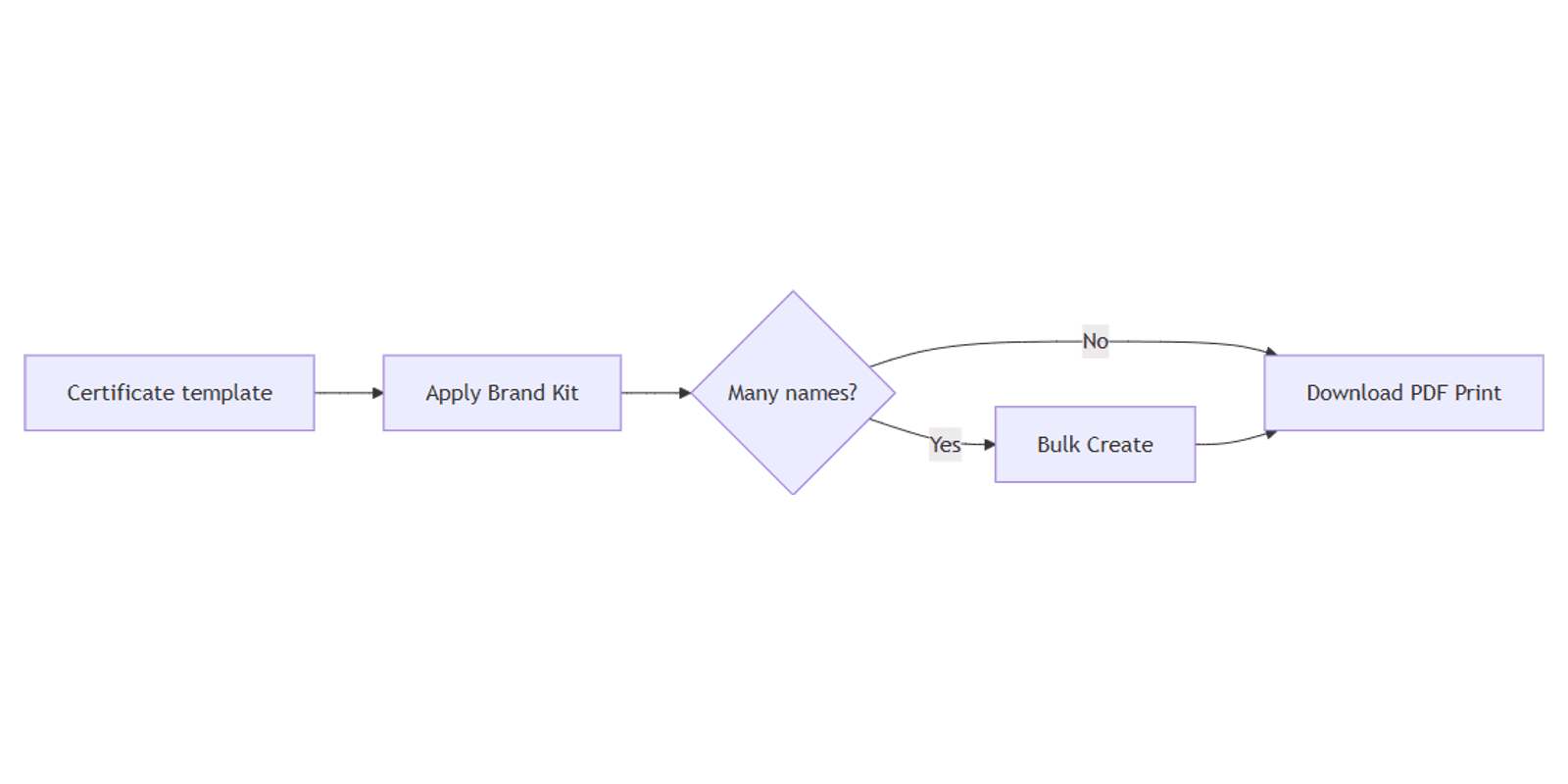
When you need dozens of certificates with different names:
- Build one certificate template with a separate text box for the name field.
- Apply Brand Kit.
- Run Bulk Create from a spreadsheet of recipients (desktop, paid-eligible plans).
- Preview rows, then generate a multi-page design or individual files.
- Download the set as PDF Print.
See the full Bulk Create flow: How to Use Canva Bulk Create.
Event date lists and ceremony checklists fit the Social Media Multi-Platform Content Planner.
Certificate vs flyer
| Design | Best for |
|---|---|
| Certificate / diploma | Named credential, framed keepsake, formal stock |
| Flyer | Promotion, handout, one primary offer |
Reuse Brand Kit across both, but do not stretch a flyer template into a diploma - borders and name hierarchy differ.
FAQ
What size should a Canva certificate be?
Match your printer stock - often Letter or A4 landscape. Confirm trim before you design.
Can I print many certificates with different names?
Yes - use Bulk Create with a name column, then PDF Print the batch (Canva Bulk Create help).
Do certificates need bleed?
Yes if backgrounds or borders go edge-to-edge. Show print bleed and keep critical text inside the safe margin (margins and bleed).
PDF Print or PNG for certificates?
PDF Print for paper. PNG is for screen mockups or digital badges, not shop handoff.
Conclusion
To create certificates in Canva, start from a landscape certificate or diploma template, apply Brand Kit, show bleed, and download PDF Print. For named cohorts, connect a spreadsheet with Bulk Create. For promotional handouts instead of credentials, use flyers.
Canva Templates
Start Selling Canva Templates - Start Now!